From TOTP to Phishing-Resistant Passkeys: A Guide to Multi-Factor Authentication
Implementing Multi-Factor Authentication (MFA) is a baseline requirement for any modern security program. However, not all MFA factors provide the same level of security assurance. When configuring an Identity Provider (IdP) like Okta, selecting the right authenticators is critical to defending against evolving attack vectors. There exists a spectrum of MFA options, from common phishable factors to the passwordless, phishing-resistant gold standard.
Foundational MFA: Knowledge and Possession Factors
These methods are the most common but also the most susceptible to social engineering and interception.
SMS, Voice, and Email: These factors are widely considered legacy and low-assurance. They are vulnerable to SIM swapping (an account takeover method where an attacker steals a victim’s phone number by porting it to a new SIM card), telephony network interception, and straightforward phishing attacks. While better than a password alone, they should be phased out of any environment housing sensitive data.
Time-based One-Time Passcodes (TOTP): Generated by authenticator apps like Google Authenticator, Microsoft Authenticator, or Okta Verify, TOTP is a significant step up from SMS. The rotating 6-digit code is generated locally on a user’s device. However, TOTP is not phishing-resistant. An attacker can use an Adversary-in-the-Middle (AitM) proxy to capture a user’s credentials and their TOTP in real-time, subsequently hijacking the session.
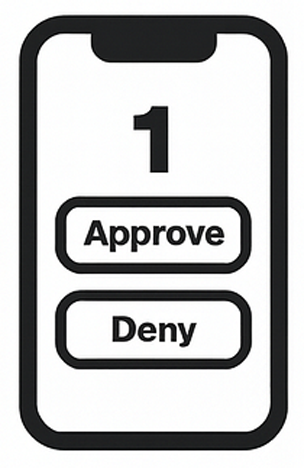
Push Notifications: Offered by Okta Verify, push notifications improve the user experience over TOTP. A simple “Approve/Deny” prompt is sent to the user’s device. To combat “push fatigue” attacks where an attacker spams requests hoping for an accidental approval, Okta’s Number Challenge is an essential control. It requires the user to enter a number displayed on their login screen into the app. While an improvement, sophisticated AitM attacks can still potentially bypass this protection.
The Gold Standard: Phishing-Resistant MFA
Phishing-resistant MFA methods create a cryptographic bond between the user, their device, and the service they are accessing. This is achieved through the FIDO2 standards, which consist of the W3C’s WebAuthn specification and FIDO’s Client to Authenticator Protocol (CTAP2).
The core principle is origin binding. The authenticator generates a unique public/private key pair for each service. The private key never leaves the secure hardware of the authenticator. During login, the service (the relying party, via Okta) sends a challenge that can only be signed by the private key. Crucially, the browser validates that the origin of the challenge matches the origin stored during registration. A phishing site at okta-login.io cannot generate a valid challenge for the legitimate company.okta.com domain, rendering the attack useless.
There are two primary types of FIDO2 authenticators:
Security Keys and Smart Cards: These are dedicated hardware devices that store the private key in a secure cryptographic element. Common examples in the commercial sector include YubiKeys and Google Titan Keys. For government entities, this role is filled by PIV (Personal Identity Verification) and CAC (Common Access Card) cards, which have long served as a high-assurance, hardware-based authenticator compatible with the FIDO2 standard.
Platform Authenticators: These are built into the device’s operating system, leveraging secure hardware like a Trusted Platform Module (TPM). Examples include Windows Hello (facial recognition, fingerprint, PIN) and Apple’s Touch ID/Face ID. They offer a seamless user experience by using biometrics the user is already familiar with.
The Future is Now: Passwordless with Passkeys
Passkeys are the user-friendly evolution of FIDO2 credentials. They are “discoverable credentials” designed to fully replace passwords, not just act as a second factor. When a user creates a passkey, the FIDO credential (the private key) is stored on their device (e.g., phone) and can be synced across their other devices using a cloud ecosystem like Apple iCloud Keychain or Google Password Manager.
This approach delivers a true passwordless experience that is inherently phishing-resistant. A user simply initiates a login on a new device (like a laptop), receives a prompt to use their nearby phone, authenticates on the phone with a biometric, and is logged in. The cross-device authentication occurs over Bluetooth Low Energy (BLE).
Strategic Implementation in Okta
Within Okta, authentication policies are the mechanism for enforcement. A best practice is to create a tiered security model.
Baseline: For low-risk applications, require at least TOTP or Push with Number Challenge for all users.
High-Assurance: For sensitive applications such as administrative consoles, financial systems, developer tools, or VPNs, mandate the use of phishing-resistant authenticators. Configure the policy to only allow WebAuthn (FIDO2) with security keys, smart cards, or platform authenticators (passkeys).
The goal should be a strategic roadmap to migrate the organization away from phishable factors. By leveraging Okta’s robust policy engine to enforce the use of passkeys and FIDO2, you can significantly elevate your security posture and protect your organization from the primary threat of credential phishing.